Solar power systems must balance photovoltaic generation, battery charging, and the electricity required by connected loads. Choosing an inverter with suitable output capacity, charging functions, monitoring interfaces, and protection features helps make system design more practical. Understanding these functions is an important step when planning an off-grid solar installation.
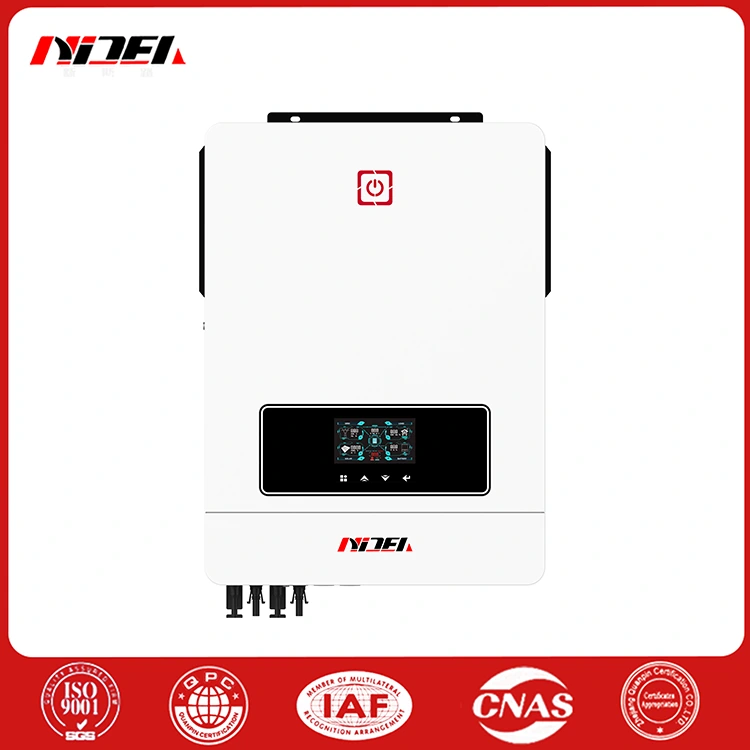
MAX Series 8200W/8200VA Off Grid Solar Inverter
When selecting an MAX Series 8200W/8200VA Off Grid Solar Inverter, it is important to consider more than rated output alone. PV array configuration, battery compatibility, charging requirements, load characteristics, and the intended operating mode all affect how the inverter should be integrated into a complete solar power system.
Select a section to jump directly to the information you need.
Understanding the Power Requirements of a Solar Installation
Every solar power installation has its own operating profile. A residential property may need to supply lighting, refrigeration, communications equipment, and household appliances. A remote workshop or small commercial site may have different load patterns, startup currents, and periods of high demand.
Before selecting an inverter, the system designer should identify the connected loads and determine which equipment needs to operate simultaneously. Motors, pumps, compressors, and other inductive loads may require additional starting capacity. The inverter's documented overload capability must therefore be checked rather than assuming that rated output alone covers every operating condition.
Photovoltaic Input
PV string voltage, current, array power, and the expected temperature range must remain within the inverter's permitted input limits.
Battery Storage
Battery voltage, chemistry, charging limits, and communication compatibility should match the intended energy storage system.
Connected Loads
Check total running demand, startup current, load priorities, and whether separate load groups are required.
Operating Mode
Confirm whether the installation will operate off-grid, use a compatible AC input, or require a supported hybrid configuration.
A well-defined load profile gives the installer a clearer basis for choosing the inverter, battery bank, PV array, protective devices, and cables as a coordinated system.
How Does 8200W/8200VA Output Support Connected Equipment?
The MAX-8.2KW model has a published rated output of 8200W/8200VA. These ratings describe its specified output power capability, but they do not establish that every combination of appliances can be operated simultaneously. The actual load arrangement must remain within the applicable electrical limits.
Pure Sine Wave AC Output
According to the product specification, the inverter provides pure sine wave AC output in battery mode. This waveform is commonly used in power systems supplying electronic equipment, household appliances, and other loads designed for conventional AC power.
Load compatibility still needs to be checked. Certain devices have specific voltage, frequency, waveform, or power-quality requirements, while motors and compressors can draw elevated current during startup. Reviewing equipment nameplates and manufacturer requirements helps determine whether the proposed load is suitable.
Selectable AC Output Voltage
The published nominal output voltage options are 220V, 230V, and 240V AC. The appropriate setting depends on the electrical requirements of the connected equipment and the destination market.
System designers should also check output frequency, the permitted voltage range, wiring arrangements, earthing requirements, and protective devices. The inverter must be configured to match the installation rather than relying on a voltage selection alone.
How Does the Built-In MPPT Controller Manage Solar Input?
Maximum Power Point Tracking, or MPPT, allows a solar charge controller to adjust its operating point in response to the electrical characteristics of the PV array. Solar panel output changes with irradiance, temperature, and other environmental conditions, so the maximum-power operating point is not constant.
The product specification lists a built-in 160A MPPT solar charge controller and an MPPT voltage range of 90–450V DC. The listed maximum PV input power is 5400W + 5400W. These values should be checked alongside the exact model's PV input current and maximum voltage limits before the array is designed.
PV String Configuration
Connecting panels in series increases string voltage, while parallel connections increase array current. The designer must calculate the cold-weather open-circuit voltage and operating current of the proposed array to ensure that all values stay within the inverter's documented limits.
Changing Sunlight Conditions
Cloud cover, shading, panel orientation, and seasonal conditions influence available solar generation. MPPT helps the controller track an appropriate operating point, but it cannot create energy when sunlight is insufficient. Battery capacity and backup arrangements should reflect the installation's expected energy demand.
Correct array sizing therefore requires a review of both electrical limits and the site's expected solar conditions. The 160A charging rating should not be interpreted as a guarantee that the system will deliver the same charging current throughout the day.
Why Are Battery Management Functions Important?
Battery charging is a central part of an off-grid power system. The inverter must coordinate charging behavior with the battery's voltage, chemistry, operating limits, and communication requirements.
The product information describes intelligent charging functions that include constant-current, constant-voltage, and floating charging modes. It also lists a nominal 48V DC battery voltage, a maximum solar charging current of 160A, and a maximum AC charging current of 140A.
Battery Compatibility
Different battery chemistries require different charging parameters. Before installation, confirm the permitted charging voltage, current, temperature range, and any battery management system communication requirements. Lithium battery activation support does not mean every lithium battery is automatically compatible.
Charging Source Coordination
Depending on the selected operating mode and configuration, the system may use PV generation and a compatible AC input for charging. The published maximum combined solar and AC charging current is 160A, so the charging settings and source combination must follow the product documentation.
Battery capacity should be selected according to the required load profile, desired autonomy, permissible depth of discharge, and expected charging opportunities. Correctly coordinated components help the system operate within its intended limits.
How Can Dual-Load Output Help Organize Power Distribution?
The product specification identifies a dual-output function that can supply two different load groups. This arrangement can be useful when an installation needs to distinguish between primary equipment and secondary loads.
For example, a site may prioritize refrigeration, communications, and essential lighting while assigning other appliances to a separate load group. Whether this arrangement meets a specific priority strategy depends on the inverter's control settings and the installation design.
Planning Load Priorities
The published specification lists a maximum main-load output of 8200W for the MAX-8.2KW model and a second-load range of 1640W to 5740W. These figures relate to the product's stated dual-load operating function and must be interpreted together with the corresponding operating conditions and configuration.
- Identify which loads are essential during limited solar generation.
- Calculate the combined demand and startup requirements of connected equipment.
- Confirm the supported second-load settings and cut-off behavior.
- Verify wiring, circuit protection, and load separation requirements.
Separating load groups can make system operation easier to plan, but it does not remove the need to size the PV array, battery, inverter, and protective equipment correctly.
How Do Communication and Protection Functions Support Operation?
Monitoring interfaces help operators review system conditions without relying entirely on local inspection. The product lists RS232, RS485, Wi-Fi, and other communication options, with available interfaces depending on the configuration.
Remote Operating Information
Compatible monitoring arrangements can provide access to parameters such as voltage, current, power, and temperature. This information can help operators identify changes in operating conditions and review system performance.
Actual remote access depends on the installed communication hardware, supported software, network availability, and configuration. The presence of a communication port alone does not guarantee access through every mobile application or monitoring platform.
Built-In Protection Functions
The published product description lists input overvoltage and undervoltage protection, output short-circuit protection, overcurrent protection, and overtemperature protection. These functions are intended to respond to specified abnormal operating conditions.
Inverter protection should be part of a broader electrical safety design that includes correctly rated breakers, fuses, isolation devices, grounding, and suitable cable sizing. Protection coordination and installation procedures should follow the manufacturer's instructions and local electrical requirements.
What Are the Key Technical Specifications?
The following table summarizes selected values published for the MAX-8.2KW model. The product page also lists a MAX-10.2KW model; values for that model should be checked separately where the two configurations differ.
| Specification | Published MAX-8.2KW Data |
|---|---|
| Rated output power | 8200W / 8200VA |
| Nominal battery voltage | 48V DC |
| Maximum solar charging current | 160A |
| MPPT voltage range | 90–450V DC |
| Nominal / maximum PV voltage | 360V / 500V DC |
| Maximum PV input power | 5400W + 5400W |
| Nominal AC output voltage | 220V / 230V / 240V AC |
| Battery-mode output waveform | Pure sine wave |
| Maximum DC/AC conversion efficiency | 98% in the listed grid-tie specification |
| Battery-mode DC-to-AC efficiency | 94% |
| Communication interfaces | RS232 / RS485 / Wi-Fi / GPRS and listed battery communication options |
| Operating temperature | −10°C to 50°C |
| Relative humidity | 5% to 95%, non-condensing |
| Product dimensions | 500 × 390 × 136 mm |
| Net weight | 14.5 kg |
Efficiency figures are associated with their specified operating modes and test conditions. Actual system performance depends on loading, temperature, battery behavior, PV conditions, wiring, and other installation factors.
What Should Be Checked Before Installation?
A practical installation review helps ensure that the inverter and its supporting components work as a coordinated system. The following items should be confirmed before commissioning.
- Assess the load profile. Record running power, startup current, daily operating periods, and essential loads.
- Verify the PV array. Check total array power, string voltage, cold-weather open-circuit voltage, input current, and MPPT limits.
- Confirm battery compatibility. Check nominal voltage, chemistry, charging limits, capacity, and communication requirements.
- Plan the AC connections. Verify output voltage, frequency, wiring, grounding, and compatibility with connected equipment.
- Coordinate protection. Select suitable protective devices, isolation arrangements, and cable sizes in accordance with applicable standards.
- Review monitoring and settings. Confirm supported communication options, operating modes, charging priorities, and load settings.
- Follow commissioning procedures. Installation, testing, and configuration should be completed by qualified personnel using the product manual.
Environmental conditions also matter. The product data lists a relative humidity range of 5% to 95% without condensation. The installation location should be assessed for moisture, ventilation, dust, and temperature, with additional protection provided where required by the installation instructions.
Frequently Asked Questions
1. What does 8200W/8200VA mean?
These are the published rated output power values for the MAX-8.2KW model. W represents real power, while VA represents apparent power. The connected load must stay within the inverter's applicable output and operating limits.
2. What is the purpose of the 160A MPPT controller?
The MPPT controller tracks the solar array's maximum-power operating point and manages solar charging within its permitted limits. Actual charging current depends on available solar power, battery conditions, system configuration, and the equipment's operating limits.
3. Can the inverter work with lithium batteries?
The product description lists a lithium battery activation function and battery-related communication options. The specific battery model, voltage range, charging settings, and BMS communication compatibility should be confirmed before installation.
4. What is the advantage of pure sine wave output?
Pure sine wave output provides an AC waveform suitable for many conventional electrical loads. Individual appliances still need to be checked for their voltage, frequency, starting current, and power-quality requirements.
5. Does dual-load output mean two independent inverters?
No. Dual-load output refers to the product's ability to provide power to two load groups through its supported output arrangement. It does not mean the unit contains two independent inverters or that each output can deliver the full rated power simultaneously under all conditions.
6. Which details are needed to select the correct configuration?
Prepare the required AC output power and voltage, load profile, PV array specifications, battery voltage and chemistry, expected charging requirements, installation environment, and intended operating mode. These details help determine whether the selected model matches the system design.
Planning a Solar Power System?
Review your load requirements, PV array, battery configuration, and operating conditions before selecting an inverter. For model-specific details and technical compatibility questions, contact the product team.
Confirm all electrical ratings and installation requirements against the latest product documentation before use.